How to create a WhatsApp bot, step by step, and test it before you publish
Creating a WhatsApp bot means building an assistant that reads what the customer sends, answers from your data, and takes an action (reply, book, or hand off to a person) on your business number.
Published on November 25, 2026
Written by Leifer Méndez, on the BuilderBot Cloud blog
Create a bot · 5 steps
Use case, template, or blank
Preview before the channel
Publish on WhatsApp, then test a voice note
Steps in this guide
5
Trial, no card
14 days
Lowest paid plan
USD 14.99/mo
Verification process for every figure
1Pick the use case and a template, a blank flow, or build it from scratch with AI
2Write prices, hours, and what the bot must not claim
3Test it in the preview, typing as the customer, before you choose a channel
4Publish the bot on WhatsApp. Creating the project does not connect the number
5Once the number is connected, test a voice note from another phone
Charts and verification status
Chart 1 · What a button menu survives
A button menu against a bot that uses your data
The preview is text. The voice note is tested on the number, after you publish.
11. HelloA greeting fits any menu and the preview.
Button menu
Bot with your data
22. A question missing from your dataIt must hand off to a person, not invent a price.
Bot with your data
33. A voice note on the connected numberThe preview does not send audio. The voice note is tested on WhatsApp.
Bot with your data
Each row is a message. The height measures nothing: it only orders the tests.Only if you set it up
Creating a WhatsApp bot means building an assistant that reads what the customer sends, answers from your data, and takes an action (reply, book, or hand off to a person) on your business number. It is not pasting ChatGPT onto a phone number. ChatGPT does not have your catalog, your hours, or your WhatsApp.
The BuilderBot Cloud trial lasts 14 days and does not ask for a card. It is not a bot that stays free forever.
What you need before you create the bot
Three things, and none of them is knowing how to code.
A WhatsApp Business number you can connect to the official API. A short list of written facts: prices, hours, what you sell, and what you do not do. And one decision: the bot answers alone, or it hands the chat to a person when it does not know.
Without that third one, the bot invents. That is the failure.
Step 1. Pick the use case and a template, or start blank
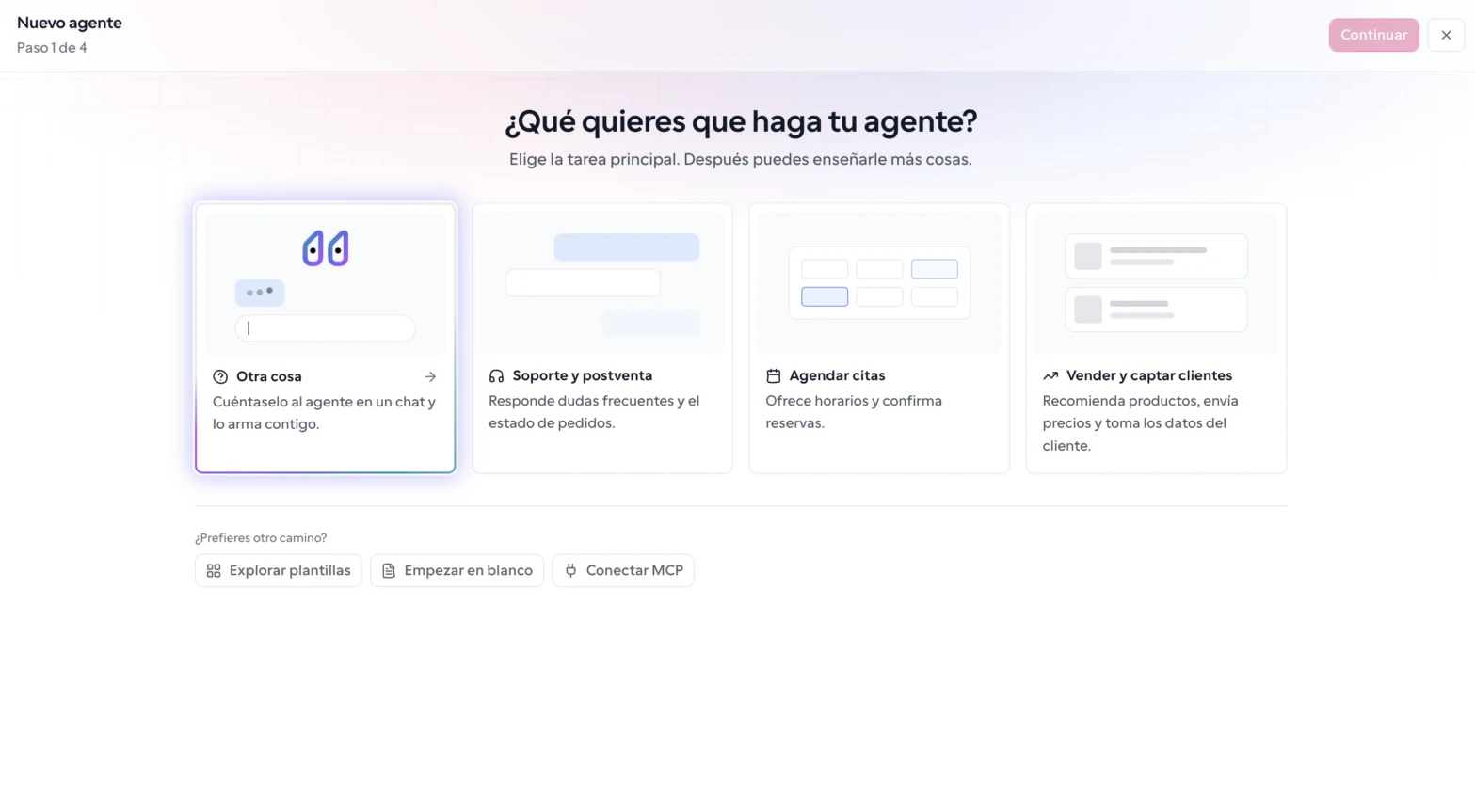
When you create the agent you pick the case: support, appointments, sales, or something else. The app then suggests templates. You can also open a blank flow or build it from scratch with AI.
Step 1 in BuilderBot Cloud: pick the main task, browse templates, or start blank. WhatsApp is connected later.
A chat asks about the business and about the facts the template needs. Creating it opens the preview. Creating the project does not choose WhatsApp: the channel is connected later.
Step 2. Write only what the bot may claim
The agent's text has one job: to limit it. Prices, hours, and policies it is allowed to say. Everything else is "I don't know, I'll pass you to the team."
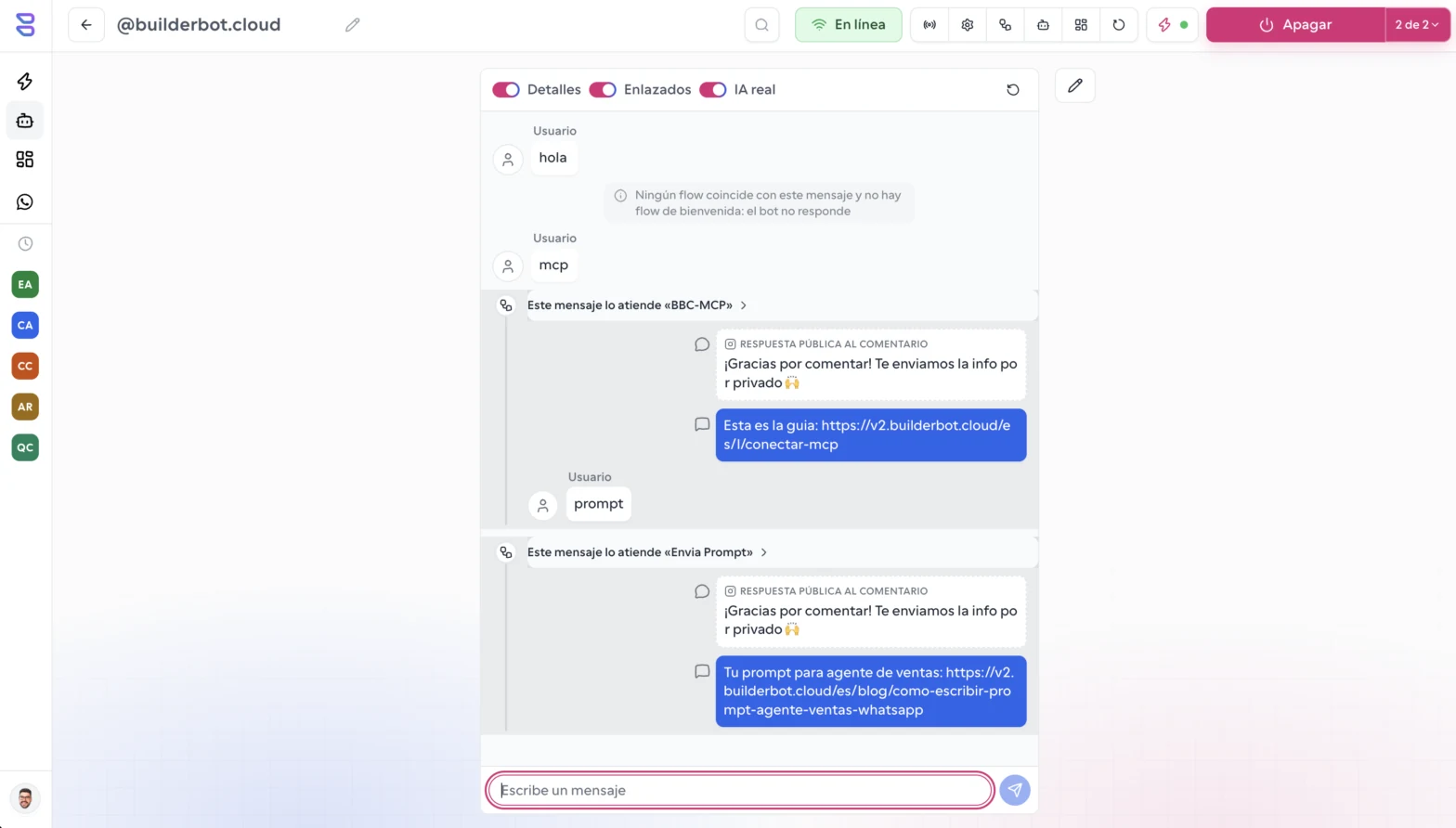
The preview simulates the conversation: you type as the customer and the bot answers with its flows. It does not connect the number and it does not send voice notes.
Step 3 in BuilderBot Cloud: the preview shows which flow handles each message and when the bot stays silent, before you connect a number.
Send three texts before you publish:
A price question that is in your data.
A question you did not answer in step 2. It must hand off to a person, not invent an answer.
Two questions in the same message.
If 2 fails, do not publish. A "hello" proves nothing.
Step 4. Publish the bot on WhatsApp
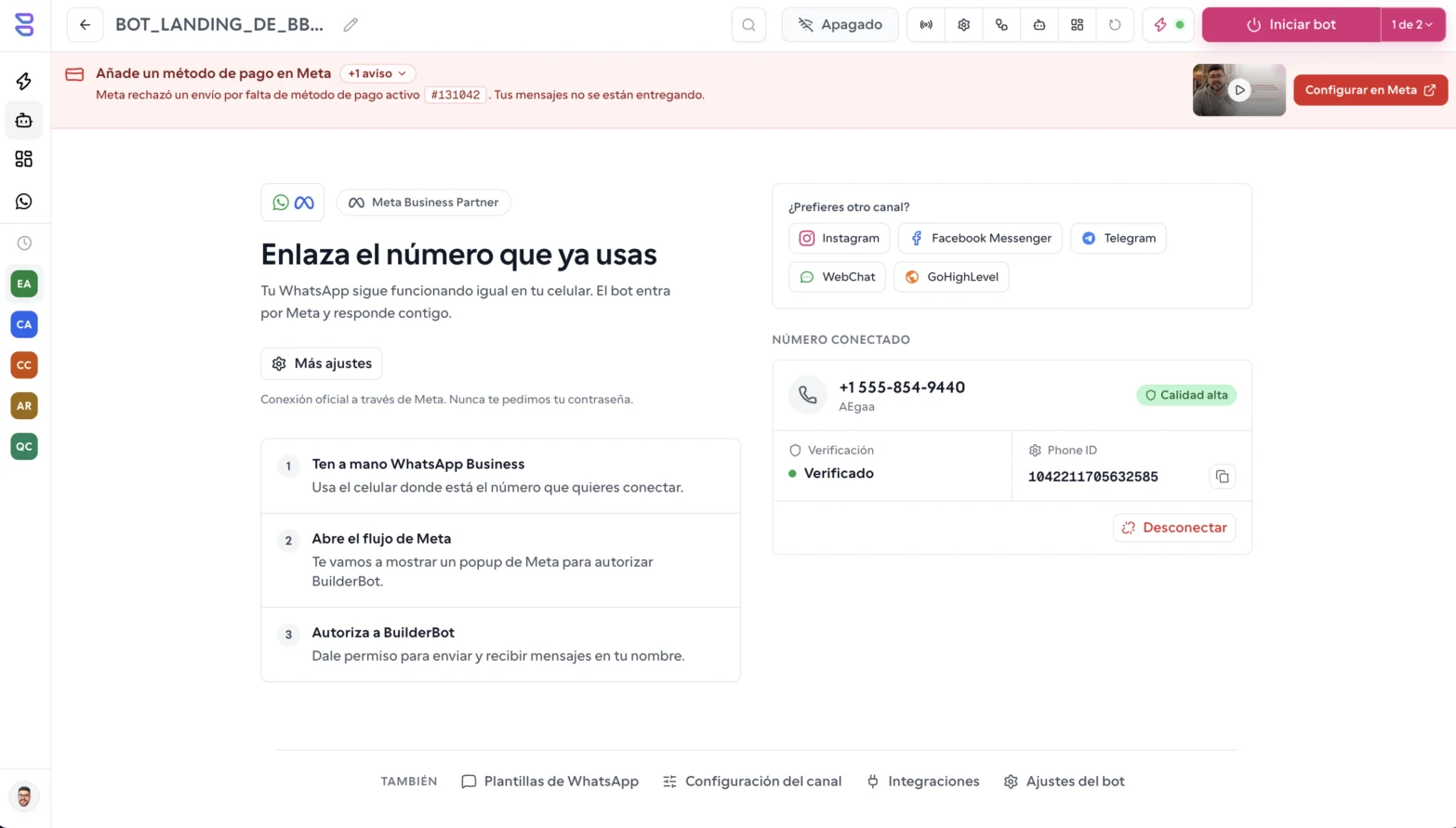
The screen is called Publish bot: you pick the channel and connect the number there. The API belongs to Meta. The tool does not replace that account, and Meta charges for messages on its own. The breakdown is in what Meta charges for the API.
Step 4 in BuilderBot Cloud: link your WhatsApp Business number through Meta's official flow and verify its connection status and quality.
After you save the channel, the app asks you to restart the bot so the change applies.
Step 5. Test a voice note on the connected number
The preview does not send audio. The voice note is tested on WhatsApp, from another phone, once the number is published.
In Mexico, Colombia, and Spain people often ask while walking. If the bot misses that note, or invents a price, correct the step 2 text the same day. The first conversation with a stranger is the test that matters.
What is free and what is not
Three bills get mixed together in ads.
Does the trial pay it?
What happens on day 15
The tool (BuilderBot Cloud)
Yes, 14 days, no card
The bot leaves the Free plan. The lowest paid plan starts at USD 14.99 per month
The number and WhatsApp API messages
No. Meta charges those
Unchanged: you see them in the Meta account, not in the tool
Your time writing prices and testing
No
Skip it and the cheap bot gets expensive
Meta's breakdown is in WhatsApp API pricing. The tool's is on pricing. If a number changes, send that page, not this article.
Where BuilderBot Cloud fits, and where it does not
It fits when you want a WhatsApp bot without code, one that reads text and voice notes and that you can limit with your own data. The path is the one above: use case and template, agent text, preview, publish on WhatsApp, then the voice note on the number.
It is the wrong tool if you only want a button menu on Instagram and you will never receive a voice note. It also does not replace the Meta account: without the official API there is no bot on the number.
What can go wrong
The bot publishes a price that is no longer valid. You prevented that in step 2 and forgot when the list changed.
The customer sends a payment screenshot and the bot ignores it. Test that case before you go live if your business runs on receipts.
The 14-day trial ends and the bot goes quiet on a Friday. Pick the paid plan before that, not on that Friday.
Frequently asked questions
How do you create a WhatsApp bot without coding?
Pick the use case and a template, or a blank flow, write the facts the bot may say, test it in the preview, and then publish it on WhatsApp. In BuilderBot Cloud you do not write code.
Is creating a WhatsApp bot free?
The trial lasts 14 days, with one chatbot and no card. After that, paid plans start at USD 14.99 per month. Meta charges for API messages separately.
How long does it take to create a WhatsApp bot?
This guide does not promise minutes. The setup is the five steps. Ready for a customer means a preview that does not invent prices, a published number, and a voice note read the same day.
Can a WhatsApp bot answer voice notes?
The product has a step that runs when the person sends audio. The preview does not play it: you type there. The voice note is tested on the number, after you publish.
Can ChatGPT be my WhatsApp bot?
Not on its own. ChatGPT is not connected to your number, your hours, or your calendar. You need a platform that ties it to those three.
Does creating the bot connect it to WhatsApp?
No. A project is a bot, and creating it does not choose the channel. WhatsApp is connected later, on Publish bot.
Can I test the bot before connecting the number?
Yes. The preview lets you type as the customer and see the reply, without the number and without sending API messages.
Can I create the bot without a template?
Yes. You can open a blank flow or build it from scratch with AI. A template only shortens the support, appointments, or sales case.
What happens on day 15 of the trial?
The bot leaves the Free plan. The lowest paid plan starts at USD 14.99 per month. What Meta charges for the API does not change that day: it was never part of the trial.
Is the WhatsApp Business phone app enough?
Not for this bot. You need Meta's official API, connected when you publish. The phone app does not replace that account.
 EN
 ES
 PT